

Knowledgebase
- Portal Home
- Knowledgebase
- Databases
- What is phpMyAdmin?
Categories
Categories
phpMyAdmin is a graphical user interface (GUI) used for managing data within a MySQL database.
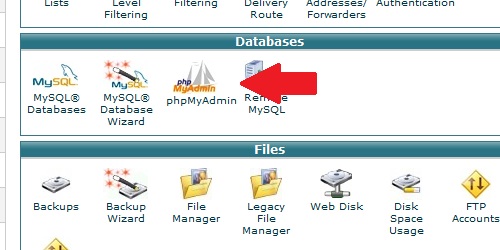
To access phpMyAdmin:
Â
- Login to cPanel.
- Locate and click on the "phpMyAdmin" icon under the "Databases" category.
Â
- 95 Users Found This Useful
Related Articles
How do I create a MySQL database?
Login to cPanel. Locate and click on the "MySQL Databases" icon in the "Databases" category....
How do I delete a MySQL database?
Login to cPanel. Locate and click on the "MySQL Databases" icon under the "Databases"...
How do I remove a MySQL user from a database?
Login to cPanel. Locate and click on the "MySQL Databases" icon within the "Databases"...
How do I delete a MySQL user?
Login to cPanel. Locate and click on the "MySQL Databases" icon under the "Databases"...
How do I add a user to a MySQL database?
Login to cPanel. Locate and click on the "MySQL Databases" icon under the "Databases"...

Loading...
Loading...