

Knowledgebase
- Portal Home
- Knowledgebase
- How do I create a mailing list?
Categories
Categories
- Login to cPanel.
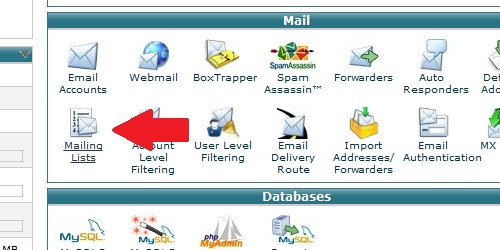
- Locate the and click on the "Mailing Lists" icon within the "Mail" category.
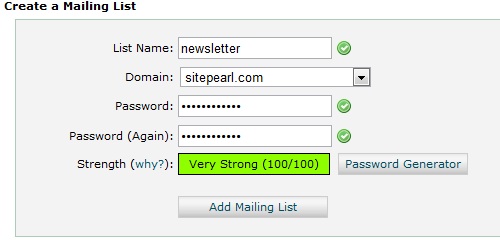
- List Name - The name of the list you want to create (newsletter, etc)
- Domain - The domain name you want the list to be created on
- Password - The password for managing the list
- Password (confirm) - Confirm the password
- 86 Users Found This Useful
Related Articles
How do I create an email account in cPanel?
Login to cPanel. Locate and click on the "Email Accounts" icon within the "Mail" category....
How do I setup my email in Microsoft Outlook 2010?
Open Outlook 2010. Go to File -> Info -> Add Account. Select the "Manually configure server...
How do I create an email forwarder?
Login to cPanel. Locate and click on the "Forwarders" icon within the "Mail" category....
How do I configure my Default Address?
Login to cPanel. Locate and click on the "Default Address"Â icon within the "Mail" category....
How do I create an email spam filter?
Login to cPanel. Locate and click on the "Account Level Filtering" icon within the "Mail"...

Loading...
Loading...